New: Become a sponsor via GitHub Sponsors!
Static website with CDN
This template describes the infrastructure for hosting a static website over HTTPS behind a CDN.
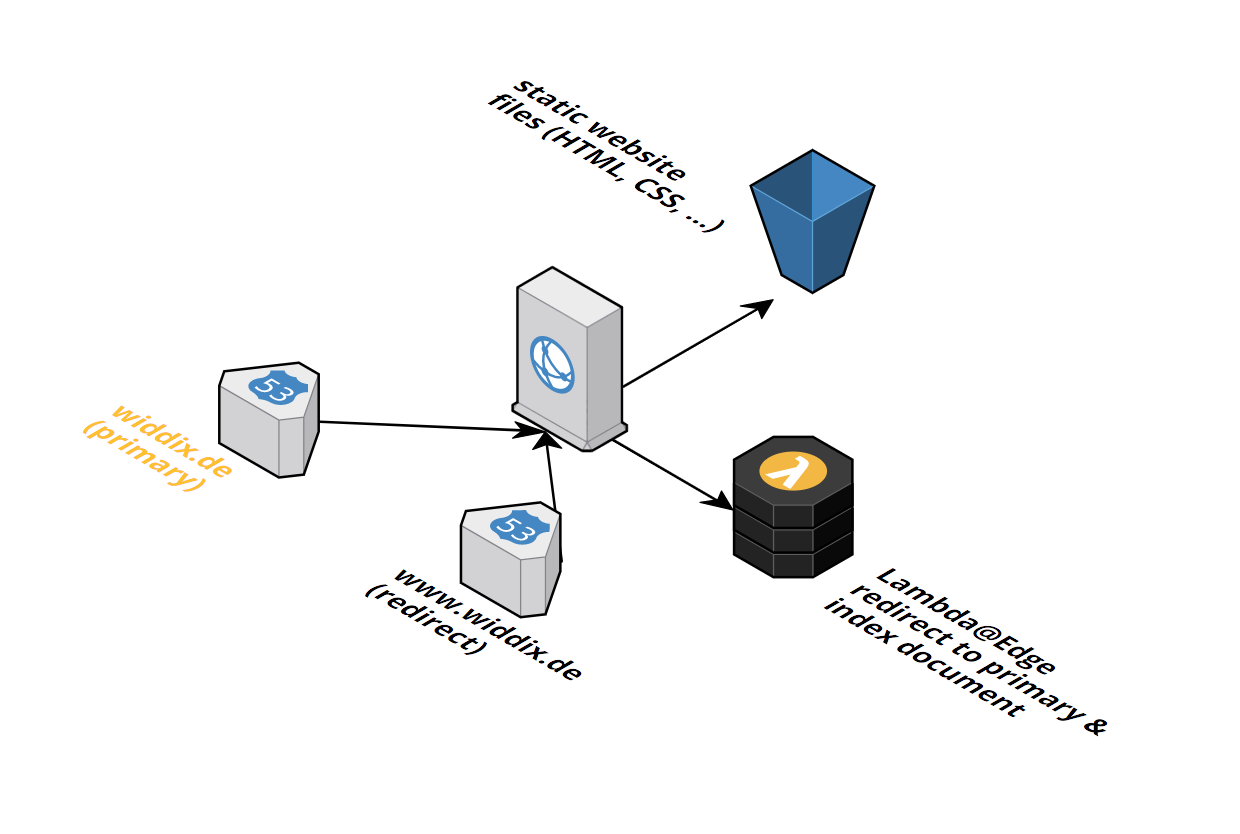
Index Document / Default Root Object
S3 and CloudFront behave differently when it comes to index document support in subdirectories. You might expect that if you have a subdirectory (e.g. folder) with a index.html file inside, that you get the file if you make a HTTP request to /folder/. Unfortunately, that's not the default behavior of CloudFront but there is a workaround using Lambda@Edge.
S3 Website Hosting behavior with Index Document (not provided by the template!)
| Resource | Response | Comment |
|---|---|---|
/ |
200 Content of index.html | |
/index.html |
200 Content of index.html | Not SEO friendly because of duplicate content on /, should redirect to / |
/folder |
302 Redirect to /folder/ |
|
/folder/ |
200 Content of index.html | |
/folder/index.html |
200 Content of index.html | Not SEO friendly because of duplicate content on /folder/, should redirect to /folder/ |
CloudFront with Default Root Object (provided by the template static-website.yaml template)
| Resource | Response | Comment |
|---|---|---|
/ |
200 Content of index.html | |
/index.html |
200 Content of index.html | Not SEO friendly because of duplicate content on /, should redirect to / |
/folder |
403 Error | Not user friendly |
/folder/ |
403 Error | Not user friendly |
/folder/index.html |
200 Content of index.html | Not user friendly |
Lambda@Edge solution (provided by the template static-website.yaml and lambdaedge-index-document.yaml template)
To improve the default CloudFront behavior, we developed a Lambda@Edge solution that gives you the following search engine optimized result.
| Resource | Response |
|---|---|
/ |
200 Content of index.html |
/index.html |
302 Redirect to / |
/folder |
302 Redirect to /folder/ |
/folder/ |
200 Content of index.html |
/folder/index.html |
302 Redirect to /folder/ |
Amazon S3 URL: https://s3-eu-west-1.amazonaws.com/widdix-aws-cf-templates-releases-eu-west-1/latest/static-website/static-website.yaml
Installation Guide
- Switch to the us-east-1 (N. Virginia) region.

- Click Next to proceed with the next step of the wizard.
- Specify a name and all parameters for the stack.
- Click Next to proceed with the next step of the wizard.
- Click Next to skip the Options step of the wizard.
- Check the I acknowledge that this template might cause AWS CloudFormation to create IAM resources. checkbox.
- Click Create to start the creation of the stack.
- Wait until the stack reaches the state CREATE_COMPLETE
- Copy the
ViewerRequestLambdaEdgeFunctionVersionARNoutput of the stack. - Switch to the region where you want to S3 bucket with static files to be created in (we recommend the use the us-east-1 (N. Virginia) region if possible).
- This template depends on one of our
zone-*.yamltemplates. - Click Next to proceed with the next step of the wizard.
- Specify a name and all parameters for the stack.
a. Set the
ViewerRequestLambdaEdgeFunctionVersionARNto the value of theViewerRequestLambdaEdgeFunctionVersionARNoutput from thelambdaedge-index-documentstack. - Click Next to proceed with the next step of the wizard.
- Click Next to skip the Options step of the wizard.
- Check the I acknowledge that this template might cause AWS CloudFormation to create IAM resources. checkbox.
- Click Create to start the creation of the stack.
- Wait until the stack reaches the state CREATE_COMPLETE
If you deployed the previous stack not to the us-east-1 (N. Virginia) region you need to deploy a monitoring stack to us-east-1 (N. Virginia)! Launch Stack
Dependencies
vpc/zone-*.yaml(required)operations/alert.yaml(recommended)state/s3.yaml(recommended)security/waf.yaml